Plan Your Warehouse Staging Area Before the Truck Arrives
Lay out your dock staging area, stage every pallet in loading order, and hand the crew a plan they can follow without asking you a single question.
Used by 2,500+ logistics professionals worldwide
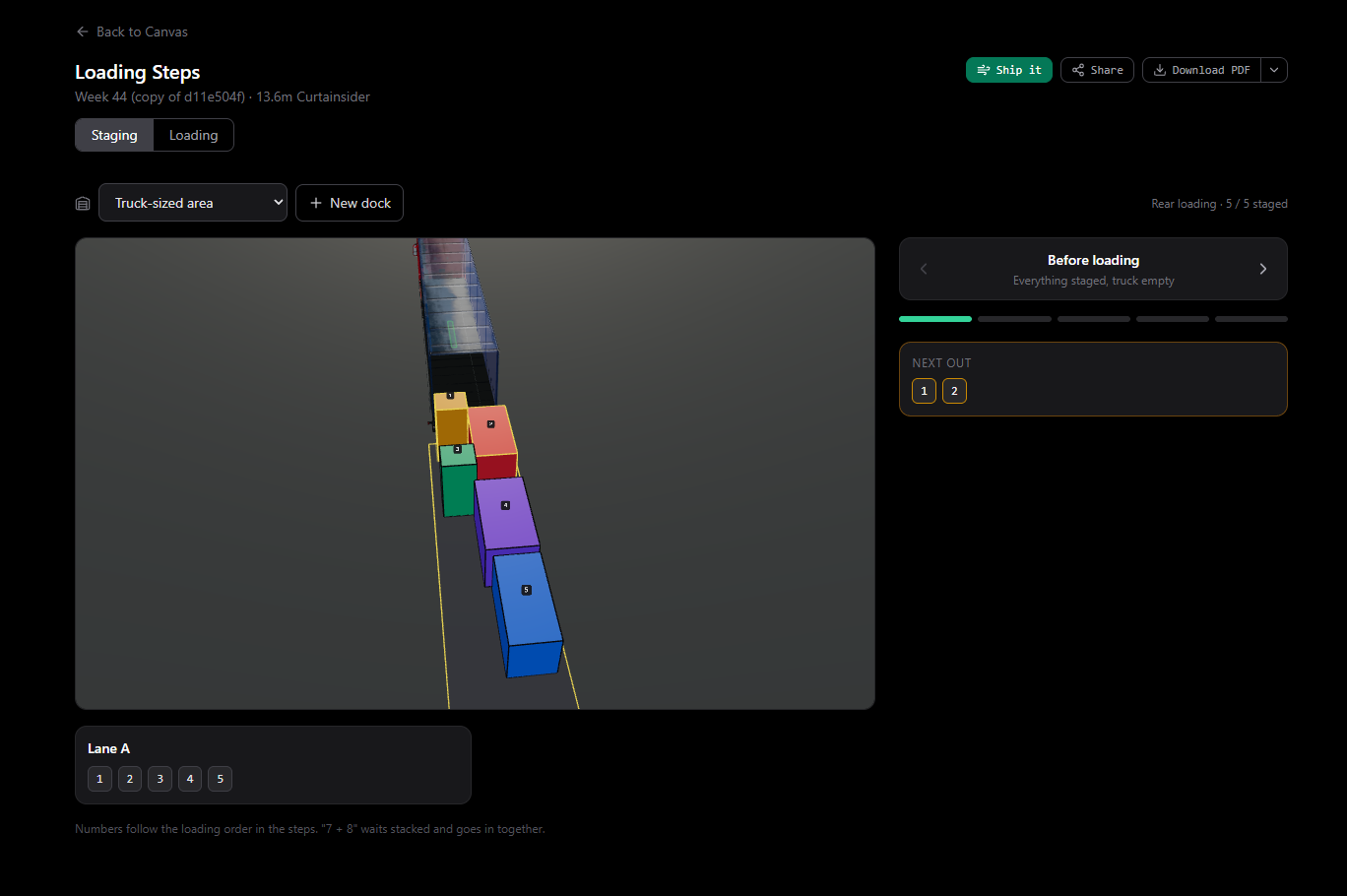
A 13.6 m curtainsider, five units staged in one lane in loading order. The step player shows what goes out next, and the numbers on the floor match the numbers in the steps.
The truck is at the door and the load is not ready
Most loading delays are made before the truck arrives.
Pallets staged in the wrong order
The first pallet to load is at the back of the lane, so the crew moves half the floor to reach it.
The plan lives in one head
The planner knows the loading order. The crew guesses it, and the truck waits while they ask.
Last-minute re-handling
Fixing the order at the dock costs forklift time, dock time and detention.
How Dock Staging Works
- 01
Plan the load
Add your cargo and let Hansatic place it in the truck or container, with weights, axle loads and the loading order worked out.
- 02
Set up your staging area
Describe the floor space you have in front of the dock as one or more lanes. Hansatic stages each unit in a lane in the order it will be loaded.
- 03
Label and stage
Every unit gets a number that matches the loading order. The crew stages the floor to match the plan and sees what goes out next.
- 04
Load by the steps
When the truck arrives, the crew follows the step player or a printed loading PDF. Share the plan by link and everyone is looking at the same thing.
One plan for the planner and the dock crew
Hansatic is the shared language between the person who plans the load and the people who load it.
For the person planning
Build the load once and coordinate everything from it.
- Place the cargo, check weight and axle loads
- Set the staging lanes to match your dock
- Share one link instead of writing instructions
For the dock crew
See exactly what to stage, where, and what goes out next.
- Numbered units that follow the loading order
- A step player showing the next units out
- A printed loading PDF that works at the dock
Labels and documents, generated for you
Everything the crew needs to stage and load the truck, from the same plan.
Numbered staging labels
Each unit carries the number of its loading step, shown on the lane map and in the 3D view.
Step-by-step loading PDF
A printable sequence with a view of every step, so the crew can load without a screen.
Pallet label page
For built pallets, a plain label page to tape onto the finished pallet.
Shareable plan link
Send the plan to the dock, the driver or the customer. They open it in the browser, nothing to install.
Your next shipment, planned and on its way.
Start free. No credit card. No install.
Used by 2,500+ logistics professionals worldwide